Creating an invoice is a basic but important part of running any business. However, many small business owners in India are not sure how to create an invoice correctly, especially when it comes to including all the required details.
If you are just starting out, it can feel confusing to decide what information to add, how to structure it, and how to make sure everything is accurate. Missing details or incorrect calculations can lead to delays in payments and unnecessary back and forth with clients.
The good part is that creating an invoice does not have to be complicated. Once you understand the right steps, you can create clear and professional invoices without any confusion.
In this guide, you will learn how to create an invoice step by step for small businesses in India. The process is explained in a simple and practical way so you can follow it easily, even if you are creating an invoice for the first time.
How to Create an Invoice (Quick Steps)
To create an invoice in India, follow these simple steps:
- Add your business details such as name, address, and contact information
- Add client details including name and address
- Assign a unique invoice number and mention the invoice date
- Add details of the product or service provided
- Include quantity and price for each item
- Calculate tax and add GST details if applicable
- Mention the total amount to be paid
- Review the invoice and send it to the client
These steps give you a clear structure to create an invoice without missing any important details.
Step by Step Guide to Create an Invoice
Now let’s understand each step in detail so you can create a proper invoice without any confusion.
Step 1: Add Your Business Details
Start by adding your business information at the top of the invoice. This includes your business name, address, and contact details. If your business is registered under GST, include your GSTIN as well. This helps your client clearly identify who is issuing the invoice.
Step 2: Add Client Details
Next, include your client’s details such as their name, business name if applicable, and address. If your client is registered under GST, you should also mention their GSTIN. This ensures the invoice is correctly addressed.
Step 3: Add Invoice Number and Date
Every invoice should have a unique invoice number. This helps you keep track of your invoices and maintain proper records. Also, include the invoice date, which shows when the invoice was created.
Step 4: Add Product or Service Details
Clearly describe the product or service you are billing for. Mention the name or description, along with the quantity and price. This helps your client understand exactly what they are being charged for.
Step 5: Calculate Tax and Add GST Details
If your business is registered under GST, you need to include the applicable tax. This may include CGST and SGST for transactions within the same state or IGST for transactions between different states. Make sure the tax is calculated correctly.
Step 6: Add Total Amount
Add up the total amount, including taxes, and clearly mention the final amount that the client needs to pay. This should be easy to identify on the invoice.
Step 7: Review and Send Invoice
Before sending the invoice, review all the details carefully. Check for any missing information or calculation errors. Once everything is correct, send the invoice to your client.
Following these steps will help you create a clear and professional invoice that is easy to understand and process.
Example of a Simple Invoice
To understand how all the steps come together, here is a simple example of an invoice format.
Basic Invoice Example

Business Name
Your Address
Contact Details
GSTIN

Invoice Number: INV 002
Invoice Date: 15 April 2026

Bill To:
Client Name
Client Address
Client GSTIN if applicable

Description of Services
Website Design Quantity 1 Price 10000
Maintenance Quantity 1 Price 3000

Taxable Value: 13000
GST 18 percent: 2340

Total Amount: 15340

Place of Supply: Maharashtra

Authorised Sign
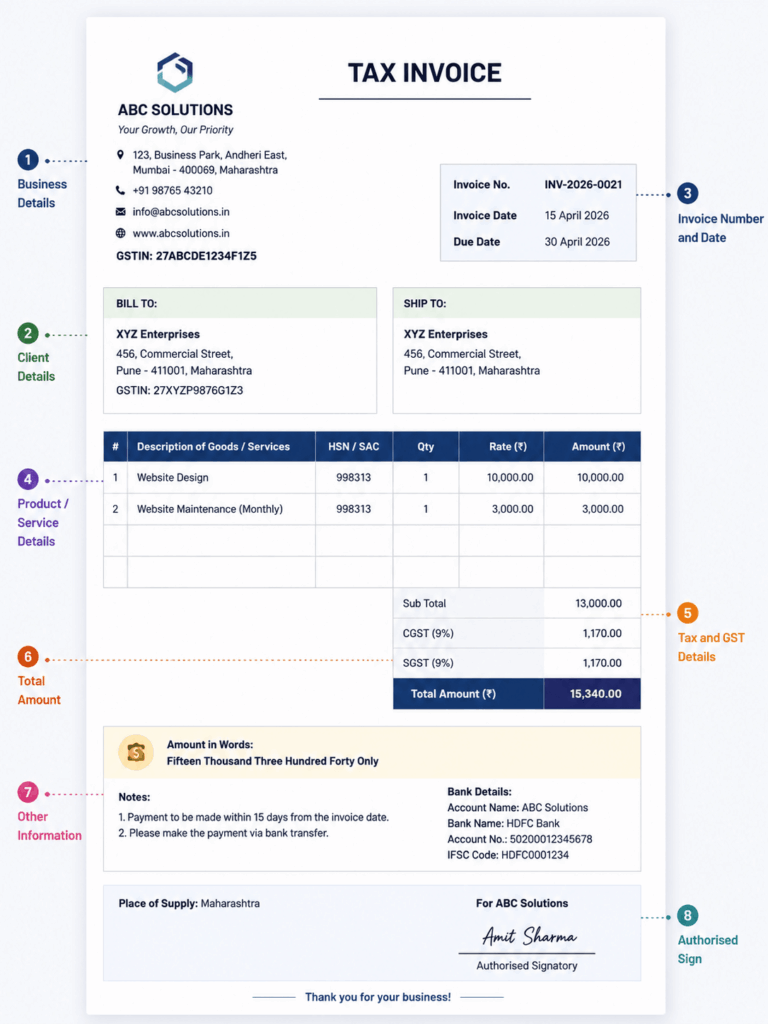
What you can learn from this example:
- All important details are clearly included
- Items, prices, and taxes are easy to understand
- The structure is simple and organised
- The total amount is clearly highlighted
This kind of format helps you create invoices that are professional, easy to read, and less likely to cause confusion.
Common Mistakes to Avoid While Creating an Invoice
While creating an invoice, small mistakes can lead to confusion or payment delays. Here are a few common ones to avoid:
- Missing important details like invoice number or date
- Incorrect calculation of totals or taxes
- Incomplete client or business information
- Vague or unclear description of products or services
- Not reviewing the invoice before sending
Avoiding these invoicing mistakes helps you create accurate invoices and ensures a smoother payment process.
Manual vs Software Invoice Creation
Creating invoices manually works when your business is small and you have only a few clients. You can use tools like spreadsheets or simple templates to prepare and send invoices.
However, as your business grows, managing invoices manually becomes more difficult. You need to enter details every time, calculate totals, and keep track of records on your own. This increases the chances of errors and takes more time.
On the other hand, using invoicing software makes the process much easier. It helps you create invoices with a proper structure, handles calculations automatically, and keeps all your records organised in one place.
With a more structured approach, you can reduce manual effort, avoid mistakes, and manage your invoicing process more efficiently.
How ebilltree Helps You Create Invoices Easily
Creating invoices manually can take time and often leads to small errors. Using a structured system helps you simplify the process and keep everything organised.
With ebilltree, you can create invoices using a clear and ready format. All the important fields are already included, so you do not have to worry about missing any details.
You can also save client information and reuse it whenever needed. This reduces repeated work and helps maintain accuracy while creating invoices.
Another benefit is automatic calculation. Taxes and totals are calculated correctly, which removes the risk of manual mistakes.
Since everything is stored in one place, it becomes easier to manage and access your invoices whenever required. This helps you stay organised and saves time as your business grows.
Conclusion
Creating an invoice does not have to be complicated. Once you understand the right steps, you can easily create clear and professional invoices for your business.
By following a structured approach, you can make sure all important details are included, avoid common mistakes, and ensure smooth communication with your clients. This also helps in getting payments on time and maintaining proper records.
For small businesses in India, having a simple and organised invoicing process can make a big difference in day to day operations.
As your business grows, managing invoices manually can become time consuming. Using a structured system can help you save time, reduce errors, and keep everything organised.
ebilltree makes this process easier by helping you create accurate invoices and manage them efficiently in one place. If you want to see how it works, you can book a demo by contacting our team.